
AI Cropper - Crop Image Online

Crop image, resize heashot, and rotate pictures easily with Evoto AI Cropper. Smart, Fast and Free.
Upload Image
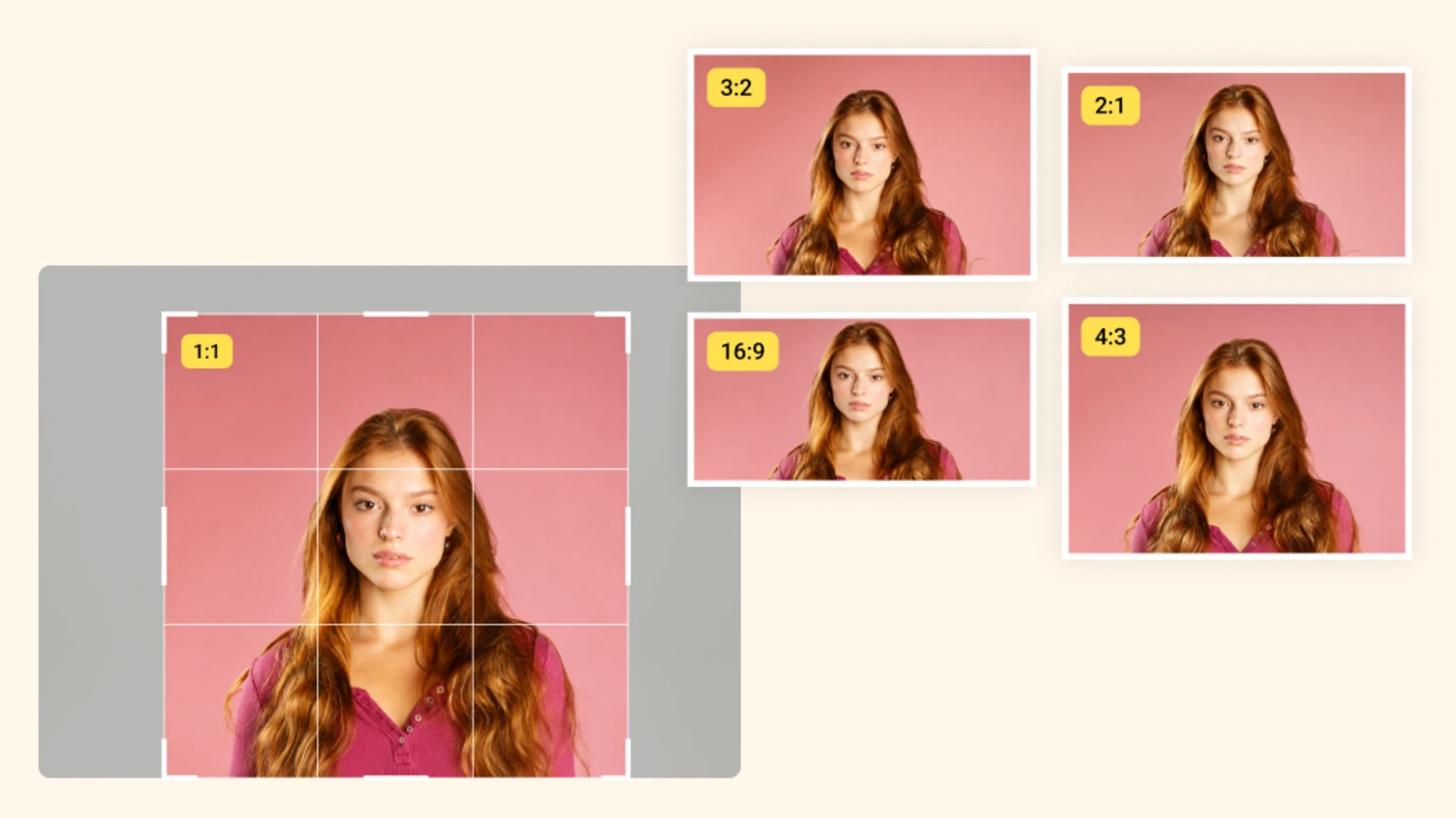
Crop Image with Evoto AI Cropper
Just upload an image or drop a file and watch the magic happen!
Upload Image or drop a file
· JPEG, JPG, PNG or WebP image allowed.
  1. /

  2. 1:1

  3. 2:1

  4. 3:2

  5. 4:3

  6. 16:9

1
2

More AI Photo Editing Services

Explore more AI services for photo editing.

Crop Image with AI Power for Perfect Photo

Evoto AI image cropper stands out with robust features powered with AI to meet diverse photo editing needs.

Headshot Crop

Detects faces automatically on headshot Crop, aligning portrait to standard ID photo dimensions like passport size. Effortless and accurate, perfect for ensuring proper photo requirements for official IDs.
Desktop
Detect Face and Crop Photo with Headshot Cropper

Flexible Crop and Resize Ratios

You have complete control over dimensions with options of common ratios, free cropping, and resize resolution setting. Whether resizing for social posts or creating a profile pictures through the AI cropper, it’s all possible with one click.
Desktop
Image Resolution Resizer with Custom Options

Photo Rotator and Flipper

Rotate images 90° or 180°, or even set custom angles. Use the photo rotator to align visuals precisely or experiment with artistic angles. Flip photos horizontally or vertically, providing creative control over orientations.
Desktop
Flip and Rotate Photo to 90 Degree

AI-Powered Horizontal Correction

Evoto AI algorithm detects photo content and adjusts alignment, maintaining a natural look. AI automatic horizontal correction ensures your photos stay aligned and professional.
Desktop
Correct Photo Horizontal and Angle on AI Rotator

Crop Image in All Kinds of Photo Editing Scenes

You can use the Evoto image cropper for professional or personal use.
Desktop
  • Image Cropper for Professional Photographers

    Professional Photography

    Ideal for the professional image photography industry! Evoto AI Image Cropper and tethered shooting make it easy to achieve high-quality and precise edits for professional, newborn, school, or wedding photographers.
  • Crop Image in Bulk

    Batch Processing in Photo Editing

    Whether you are in the photo editing industry or editing images for personal use, our bulk cropper and batch resizer always save your time. Enhance productivity when managing large quantities of images.
  • Crop Image for Creative Content Design

    Creative Design and Content Creation

    Our picture cropper and rotator options are perfect for adding unique perspectives to visual projects. Make it fast to decide photo frames and positions for those in the creative design industry or editing blog content.
  • Crop and Edit Photo for Personal Use

    Everyday Personal Use

    Evoto AI picture cropper is suitable for anyone needing quick adjustments on selfie photos. Get stunning AI cropped images whether for social media posts, ID photos, passport headshots or common resizing images.

Custom and Get Photo Sizes You Want on All Platforms

Evoto AI Image Cropper combines convenience and precision, offering a range of benefits.
Desktop
  • Standard Photo Size Cropper

    Standard ID Photo Size Cropping

    Perfect for ID photos, the crop image tool automatically applies passport-size photo dimensions and other standard photo sizes like 2x2, 3X4, 5x7 and more.
  • Batch Resize Presets

    Custom Sizes for Batch Editing

    Set a custom photo cropping size and apply it across images in bulk. Ideal for managing consistent dimensions in large headshot photo collections.
  • Crop Image in Pixel or Inch

    Flexible Units and Quick Adjustments

    Support px, cm, and inch in photo sizes setting. Crop image Easily adapt across projects with quick slider bar adjustments.
  • AI Image Cropper Compatible with macOS Windows iPadOS

    Cross-Platform Compatibility

    Our AI Image Cropper is designed for macOS, Windows, and iPadOS, ensuring a smooth experience regardless of platform.

How to Crop Images with Evoto Headshot Crop

Desktop
Upload Photo to Evoto AI Image Cropper
1.Upload Your Photo234
Select the headshot photo you want to crop and import it to Evoto AI Image Cropper.
  1. 1. Upload Your Photo

    Select the headshot photo you want to crop and import it to Evoto AI Image Cropper.
  2. 2. Choose Crop Settings

    Go to “Crop & Rotate” panel and find “Headshot Crop” in “Crop”. Select the headshot photo size you want from the drop menu to crop image instantly.
  3. 3. Adjust Photo (Optional)

    Use the Rotator, Flipper, AI Horizontal Correction or other tools in “Rotate” if needed.
  4. 4. Save Photo Edits and Export

    Press the “OK” button to save changes, then export the cropped headshot photo.
Desktop

Their Stories with Our Crop Image Editor

ID Photo Cropping for Photographers

With Headshot Crop, a professional photographer adjusts photo to meet passport size photo dimensions, driver license photo, student IDs and visas or any other required standard.
Desktop
Headshot Cropping for Passport

E-Commerce Bulk Processing

With the bulk image cropper, the team of a fashion products e-commerce company apply a uniform crop and resize to product images in batches in seconds, ensuring consistency across their website.
Desktop
Bulk Crop Image for E-Commerce Product Photo

Creative Design Cropping

A visual designer working in digital marketing campaigns crops images to any size with Evoto. He manages to experiment ads, social media, and other online content with unique dimensions for various platforms.
Desktop
Creative Image Cropping for Designers

Social Media Content Enhancement

An influencer looking to grow their audience used Evoto profile picture cropper to create perfect PFP for social media profiles. Using the crop and rotate tools, the influencer also created striking posts that visually stood out.
Desktop
Social Media Profile Image Cropper

Evoto AI Photo Editor for More Opportunities to Succeed

Try Evoto AI Crop Image Editor and make your photos best! Available on Windows, MacOS and iPadOS.

Desktop

FAQs

  • What is the USA passport photo size?

  • What are the standard dimensions for printing photos?

  • What photo ratios should I use for social media?

  • How can I rotate an image in Evoto?

  • How can I adjust the pixel size of a photo?

  • What photo editing features does Evoto AI include besides AI Crop Image?

  • Can I crop images in bulk using Evoto?

  • How do I flip an image horizontally or vertically in Evoto?

  • How can I adjust the angle of a photo for a level horizon?

  • Can I create custom crop presets for batch processing?