Change gloomy sky in photos with Evoto AI Sky Replacer. One-click get sky replacement by adding stunning sky backgrounds like a clear blue sky, beautiful sunset, or starry night.
Before
After
Processing
Rate this result
Upload Image
* JPEG, JPG, PNG or WebP image allowed.
Processing your image
0%
Private processing · Preview without signing up
No image? Try one of these
Select Sky
webEditor.noSelectTips.skyReplacement._value
Blue Skies
Bright Blue Skies
Starry Nights
Sunset & Sunrise Skies
01
02
03
04
05
06
07
08
09
10
11
12
13
14
15
16
17
18
19
20
21
22
23
24
25
26
27
28
29
30
31
32
33
34
Up to 8 images, JPEG, JPG, PNG or WebP image allowed
Evoto AI automatically blends the sky with objects in the frame, eliminating harsh lines or mismatched lighting, giving you perfect results with next to no effort.
Evoto AI is the trusted choice of thousands of industry professionals worldwide, covering commercial weddings, portraits, studio work, and so much more.
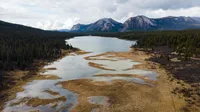
An ecological photographer replaced the dull sky with a majestic dark storm sky for the serene beauty of a forested wetland, heightening the emotional impact of the scene and emphasized the raw beauty of nature.
A campus photographer replaced the cloudy sky with a vibrant blue sky background for a series of graduation photos, adding a professional touch to commemorate their special day.
A sports event photographer enhanced his action shots by swapping the sky with a passionate sunset sky, creating a sense of energy and giving the photos an atmosphere of tension.
A travel blogger documenting ancient monuments changed the bland sky with a heavy, cloud-filled sky in photos, conveying a deep sense of history, the grandeur and timelessness of the ancient sites.
Sky replacement is the process of replacing the sky in your photo with a new sky, using AI tools for natural blending.
Q
How does AI sky replacement work?
A
The AI sky replacer detects the sky area through AI algorithm and seamlessly replaces it with a selected sky while maintaining natural transitions with the foreground.
Q
Can I remove the sky background entirely?
A
Yes, you can remove the sky background and replace it with a different image or leave it transparent.
Q
Does Evoto support batch editing for sky replacement?
A
Yes, our AI Sky Editor supports batch processing in sky replacement, allowing you to change the sky in multiple images at once.
Q
How do I adjust the sky background to match my photo?
A
You can adjust the sky image angle, color, and clarity of the sky to ensure it matches the tone of the foreground.
Q
Can I add a starry sky image to my photo?
A
Yes, you can replace the sky with a starry sky image or any other sky you choose from our extensive library.
Q
Is it possible to change the sky in wedding photos?
A
Absolutely! You can replace the sky in wedding photos to enhance the mood, whether with a sunny sky or a romantic sunset.
Q
How does the tool handle reflections in water?
A
Evoto AI Sky Changer makes use of AI algorithms to automatically adjust the sky reflections on waters for a realistic look.
Q
What are the best scenarios for using sky changer?
A
The sky changer is ideal for wedding photography, landscape photography, travel shots, and commercial photography.
Q
Does Evoto offer sky filters for aesthetic photos?
A
Yes, you can apply various sky filters to give your photo a unique, aesthetic touch.
Last updated: 2025-01-02. Reviewed by: Evoto Product Team. Results may vary depending on image quality, lighting, subject pose, file format, and selected settings.