



Edit RAW photos, batch-process images, and streamline your workflow.Download Evoto
Take a full retouching toolkit wherever you go. Edit anytime and save your results with ease.Download Evoto

AI Lawn Replacement:
Make Grass Green and Lush in Photos

Replace dull or patchy grass, fill bare patches, and make brown grass greener in your photos with Evoto.
Create lush, natural-looking grass that seamlessly blends into the original scene.
Evoto AI replaces a patchy brown lawn with lush green grass Before
Evoto AI replaces a patchy brown lawn with lush green grass After
Before
After
Upload Image
* JPEG, JPG, PNG or WebP image allowed.

Private processing · Preview without signing up

No image? Try one of these
Evoto AI replaces a patchy brown lawn with lush green grass
Example 2
Evoto AI replaces a patchy brown lawn with lush green grass
Upload Image
Free to try. Pro Editing at Your Fingertips.
buy now
buy now

Replace Grass in Photos for Lush, Natural-Looking Lawns

Replace dull, brown, or patchy grass in your photos with lush, natural-looking grass using Evoto's AI lawn replacement tool.
Give outdoor photos a cleaner, more polished look without time-consuming manual editing.

AI-Powered Lawn Detection & Flexible Area Selection

Evoto AI automatically detects the entire lawn area in your photo and creates a precise mask for full-lawn replacement. For more targeted edits, use the manual masking tool to select specific areas you want to replace before generation, such as patchy grass or bare patches.

One-Click Grass Generation & Replacement

Once the lawn area is selected, click Generate, and Evoto automatically creates edited versions of your original photo, with the selected area replaced by newly generated grass. Dull, brown, or patchy grass is transformed into lush, natural-looking grass, while the rest of the photo remains intact. Compare the results and choose the version you prefer—without manual compositing or texture work.

Natural-Looking Grass with Custom Color Controls

Evoto naturally blends newly generated grass into the original photo, preserving smooth, natural transitions where grass meets people, fences, sidewalks, and other fine edges. After generation, fine-tune the new grass using color temperature, hue, saturation, and brightness controls to better match your photo's lighting and overall look. Create a cohesive, natural-looking lawn without harsh cutouts or visible seams.

Newly generated grass blends naturally with people, fences, sidewalks, and surrounding areas
Before
After

AI Lawn Replacement for Real Estate, Landscape & Outdoor Photography

• Real Estate Photography: Enhance curb appeal by replacing dull or patchy lawns with lush, natural-looking grass for more professional property photos.
• Architectural Photography: Replace uneven or discolored grass to keep outdoor spaces clean and the focus on the architecture.
• Landscape Photography: Replace sparse or discolored grass with rich, healthy greenery to enhance the depth and visual appeal of outdoor scenes.
• Outdoor Portraits & Weddings: Replace uneven or patchy lawns in portrait, wedding, and family photos for a cleaner, more cohesive backdrop.
• Commercial & Marketing Visuals: Create polished outdoor visuals with consistent, healthy greenery for advertising, campaigns, and other marketing materials.

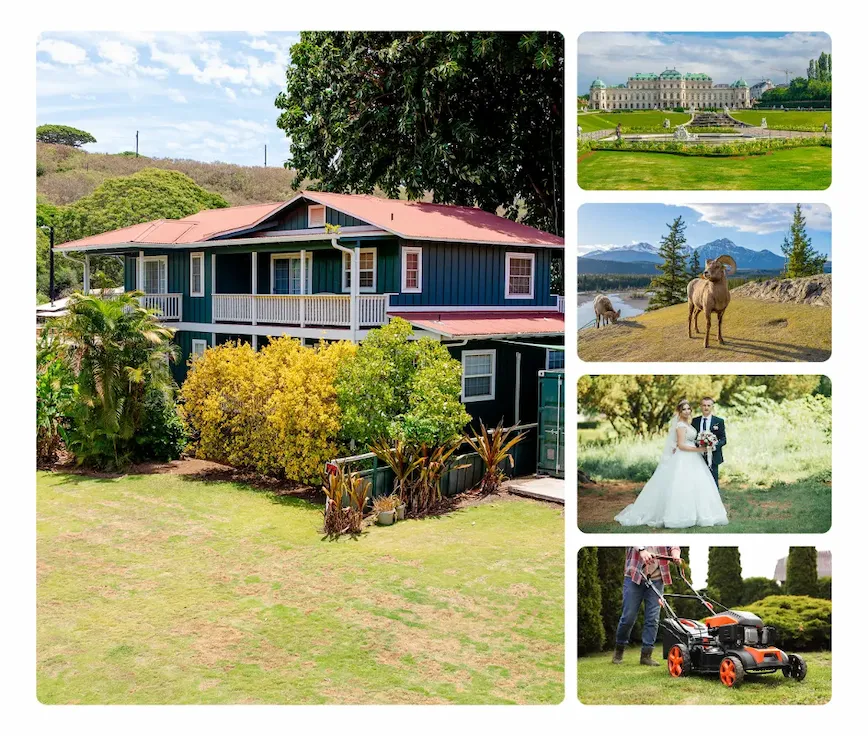
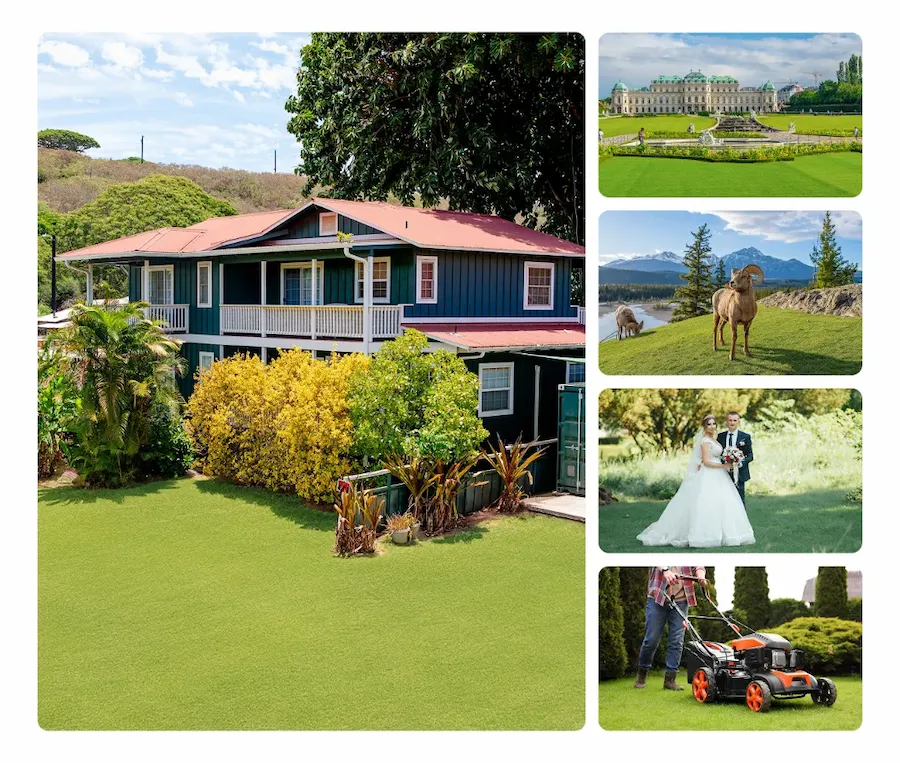
Evoto AI lawn replacement in real estate, landscape, and outdoor portrait photos
Before
After

Why Choose Evoto AI Lawn Replacement?

Manual grass replacement is slow, hard to repeat, and easy to get wrong. Evoto AI replaces grass in seconds and keeps the result looking natural in every photo.

  • Evoto replaces a lawn in seconds with AI-powered detection and grass generation

    Faster Than Manual Editing

    Tasks that once required selections, masking, and layer work in Photoshop can now be completed in seconds. Evoto AI handles lawn detection and grass replacement automatically, so you can spend more time on creative decisions instead of pixel-level editing.
  • Evoto makes grass replacement easy for users without advanced editing skills

    No Editing Skills Required

    Designed for professionals and beginners alike, Evoto makes lawn replacement accessible without advanced photo-editing skills. Whether you're a real estate agent, family photographer, or marketing specialist, you can replace grass and create polished outdoor photos with a simple, intuitive workflow.
  • Evoto replaces dull or dormant grass with healthy, natural-looking lawns in any season

    Green Lawns in Any Season

    Outdoor shoots don't always line up with good grass. Evoto replaces dull, brown, or dormant grass with healthy, natural-looking lawns, so seasonal conditions don't limit the look you want to achieve.
  • Fine-tune the color of newly generated grass for greater creative control

    Full Control Without Complexity

    Evoto combines AI-powered grass replacement with flexible editing controls. Choose the entire lawn with automatic detection or select specific areas manually, then fine-tune the generated grass with color temperature, hue, saturation, and brightness controls. Get the efficiency of AI without giving up control over the final look.


How to Replace Grass in Photos with Evoto

Upload a photo with grass to Evoto for AI lawn replacement
1.**Upload Your Photo**234
Upload a clear photo that includes the lawn or grass area you want to replace.
  1. 1. Upload Your Photo

    Upload a clear photo that includes the lawn or grass area you want to replace.
  2. 2. Select the Grass Area

    Let Evoto AI automatically detect the entire lawn and create a precise mask, or use manual masking to select only the areas you want to replace.
  3. 3. Generate and Replace Grass

    Click Generate to create edited versions of your photo, then choose the version you prefer. Fine-tune the new grass with color temperature, hue, saturation, and brightness controls for the look you want.
  4. 4. Preview & Export

    Preview the result, then export your edited photo in high quality.

Read More about AI Photo Editing

Replace Grass in Your Photos in Seconds

No reshoots needed. Generate fresh, natural-looking grass and replace dull or patchy lawns in your photos—even when the real grass is out of season. Create polished outdoor photos without waiting for the perfect lawn.

FAQs

  • What is lawn or grass replacement in photo editing?

  • How does the grass replacement work?

  • Will the replaced grass look natural?

  • What parts of my photo stay unchanged?

  • Can I choose which areas of grass are replaced?

  • Can I adjust the color of the replaced grass?

  • What kind of photos work best for lawn replacement?

  • Can I use Evoto AI Lawn Replacement on brown or dormant lawns?

  • Can lawn replacement be used for real estate and marketing photos?

  • How is Evoto AI different from Photoshop for replacing grass?

Last updated: 2026-10-14. Reviewed by: Evoto Product Team. Results may vary depending on image quality, lighting, subject pose, file format, and selected settings.